" height="52.386755px" id="GcqyfcMkE" transform="translate(299.121 0.806)" width="53.87900000000002px"/><path d="M 50.225 38.121 C 50.225 40.7 49.634 42.957 48.452 44.892 C 47.324 46.826 45.685 48.491 43.536 49.888 C 41.441 51.232 38.835 52.252 35.718 52.951 C 32.656 53.65 29.19 53.999 25.322 53.999 C 21.184 53.999 17.504 53.596 14.28 52.79 C 11.11 51.984 8.45 50.855 6.301 49.405 C 4.152 47.954 2.54 46.181 1.465 44.086 C 0.391 41.99 -0.093 39.626 0.015 36.993 L 11.217 36.993 C 11.271 38.229 11.62 39.33 12.265 40.297 C 12.91 41.265 13.85 42.071 15.086 42.715 C 16.376 43.306 17.961 43.763 19.841 44.086 C 21.775 44.408 24.005 44.569 26.531 44.569 C 28.626 44.569 30.426 44.435 31.93 44.166 C 33.489 43.844 34.751 43.441 35.718 42.957 C 36.739 42.474 37.465 41.856 37.894 41.103 C 38.378 40.297 38.62 39.357 38.62 38.283 C 38.62 37.047 38.217 36.08 37.411 35.381 C 36.605 34.629 35.503 34.038 34.106 33.608 C 32.763 33.125 31.178 32.775 29.351 32.56 C 27.578 32.292 25.725 32.05 23.79 31.835 C 21.104 31.566 18.364 31.217 15.57 30.787 C 12.829 30.304 10.304 29.552 7.994 28.531 C 5.737 27.456 3.883 25.952 2.433 24.017 C 0.982 22.083 0.257 19.504 0.257 16.28 C 0.257 13.701 0.821 11.418 1.949 9.43 C 3.077 7.442 4.716 5.749 6.865 4.352 C 9.015 2.955 11.594 1.881 14.602 1.128 C 17.665 0.376 21.104 0 24.919 0 C 28.733 0 32.118 0.349 35.074 1.048 C 38.083 1.746 40.635 2.794 42.73 4.191 C 44.826 5.534 46.464 7.2 47.646 9.188 C 48.829 11.176 49.5 13.459 49.661 16.038 L 38.378 16.038 C 38.056 13.835 36.739 12.197 34.429 11.122 C 32.172 9.994 28.975 9.43 24.838 9.43 C 22.796 9.43 20.97 9.591 19.358 9.913 C 17.799 10.182 16.483 10.612 15.408 11.203 C 14.334 11.74 13.528 12.412 12.991 13.218 C 12.453 13.97 12.185 14.856 12.185 15.877 C 12.185 17.167 12.561 18.215 13.313 19.02 C 14.065 19.826 15.086 20.471 16.376 20.955 C 17.665 21.438 19.143 21.814 20.808 22.083 C 22.474 22.298 24.247 22.513 26.128 22.728 C 28.814 22.997 31.581 23.346 34.429 23.776 C 37.33 24.205 39.936 24.958 42.247 26.032 C 44.611 27.053 46.518 28.504 47.969 30.384 C 49.473 32.265 50.225 34.844 50.225 38.121 Z" fill="rgb(0, 0, 0)" height="53.9987px" id="lS44lmYd8" transform="translate(245.487 0)" width="50.224778545288416px"/><path d="M 0 52.387 L 0 0 L 11.606 0 L 11.606 52.387 Z" fill="rgb(0, 0, 0)" height="52.386755px" id="n9sDbTX3Q" transform="translate(225.91 0.806)" width="11.605999999999995px"/><path d="M 0 52.387 L 0 0 L 11.606 0 L 11.606 42.554 L 41.587 42.554 L 41.587 52.387 Z" fill="rgb(0, 0, 0)" height="52.386755px" id="o9XqVgPdf" transform="translate(176.738 0.806)" width="41.58699999999999px"/><path d="M 29.579 0 C 36.349 0 41.587 1.612 45.295 4.836 C 49.002 8.06 50.856 12.653 50.856 18.617 C 50.856 21.519 50.372 24.152 49.405 26.516 C 48.492 28.88 47.121 30.868 45.295 32.48 C 43.522 34.092 41.292 35.328 38.605 36.187 C 35.973 37.047 32.964 37.477 29.579 37.477 C 29.095 37.477 28.155 37.477 26.758 37.477 C 25.415 37.423 23.83 37.396 22.003 37.396 C 20.23 37.342 18.403 37.316 16.522 37.316 C 14.642 37.262 13.003 37.208 11.606 37.154 L 11.606 52.387 L 0 52.387 L 0 0 Z M 11.606 27.725 C 12.895 27.725 14.4 27.752 16.119 27.805 C 17.839 27.805 19.531 27.832 21.197 27.886 C 22.916 27.94 24.421 27.966 25.71 27.966 C 27 27.966 27.832 27.966 28.209 27.966 C 31.808 27.966 34.468 27.161 36.187 25.549 C 37.961 23.937 38.847 21.626 38.847 18.617 C 38.847 15.662 37.961 13.459 36.187 12.009 C 34.414 10.558 31.755 9.833 28.209 9.833 L 11.606 9.833 Z" fill="rgb(0, 0, 0)" height="52.386755px" id="suqroaqh_" transform="translate(117.978 0.806)" width="50.85600000000001px"/><path d="M 0 52.387 L 17.76 0 L 29.77 0 L 12.01 52.387 Z" fill="rgb(0, 0, 0)" height="52.386836px" id="x_vldLCsS" transform="translate(80.8 0.806)" width="29.769999999999996px"/><path d="M 0 0 L 12.089 0 L 24.743 38.847 L 37.477 0 L 48.115 0 L 60.849 38.847 L 73.503 0 L 85.592 0 L 67.861 52.387 L 55.127 52.387 L 42.796 14.91 L 30.465 52.387 L 17.731 52.387 Z" fill="rgb(0, 0, 0)" height="52.386755px" id="Gz920m9KP" transform="translate(0 0.806)" width="85.592px"/></svg>)
Time Tracking
Time entry teams will love
Capture time as work happens with an experience designed to stay out of the way, making accurate time entry easy to keep up with.
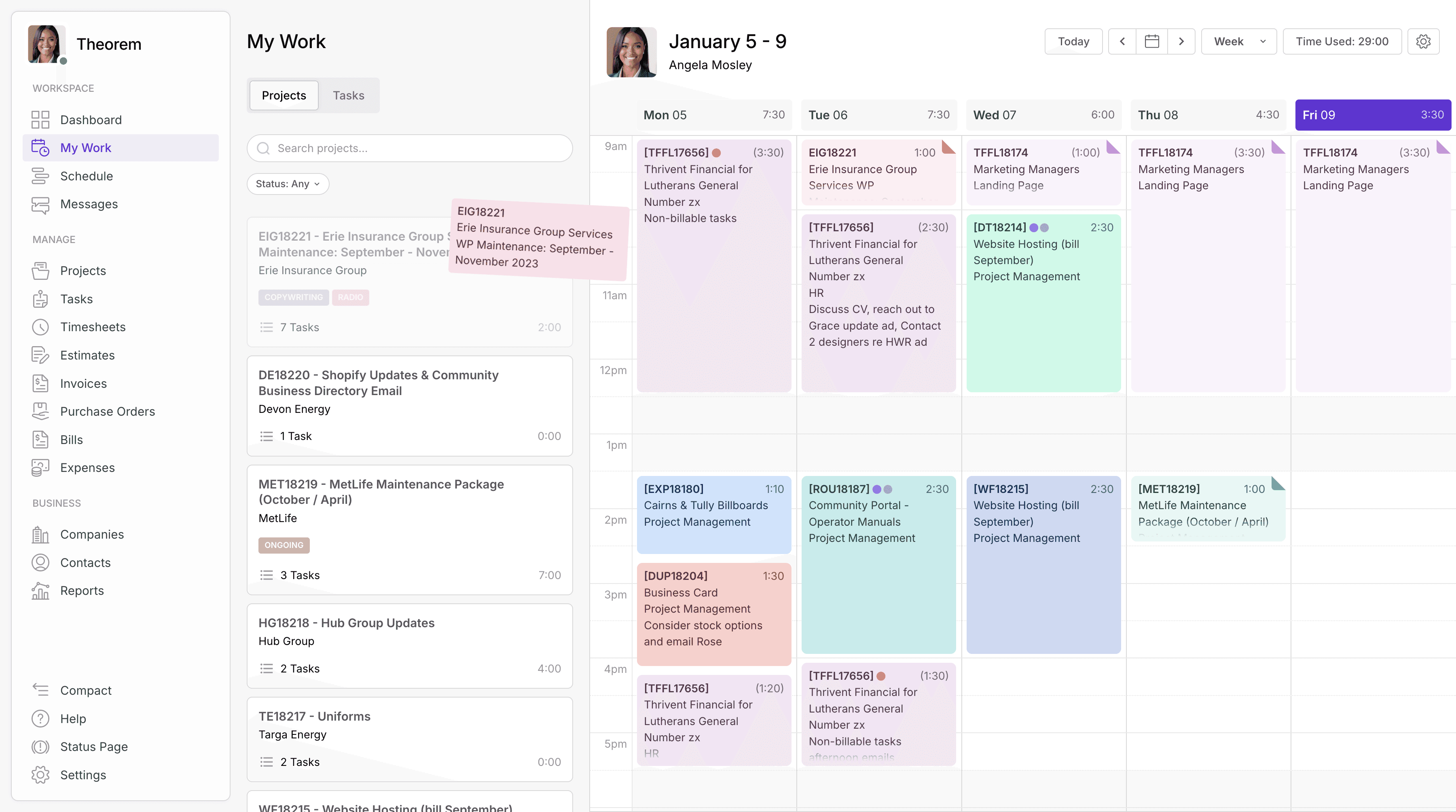
Time Calendar
Visualise time entries with clear and intuitive calendars
View time logged across days and weeks in a familiar calendar layout, making it easy to review activity, spot gaps, and understand how time is being spent.
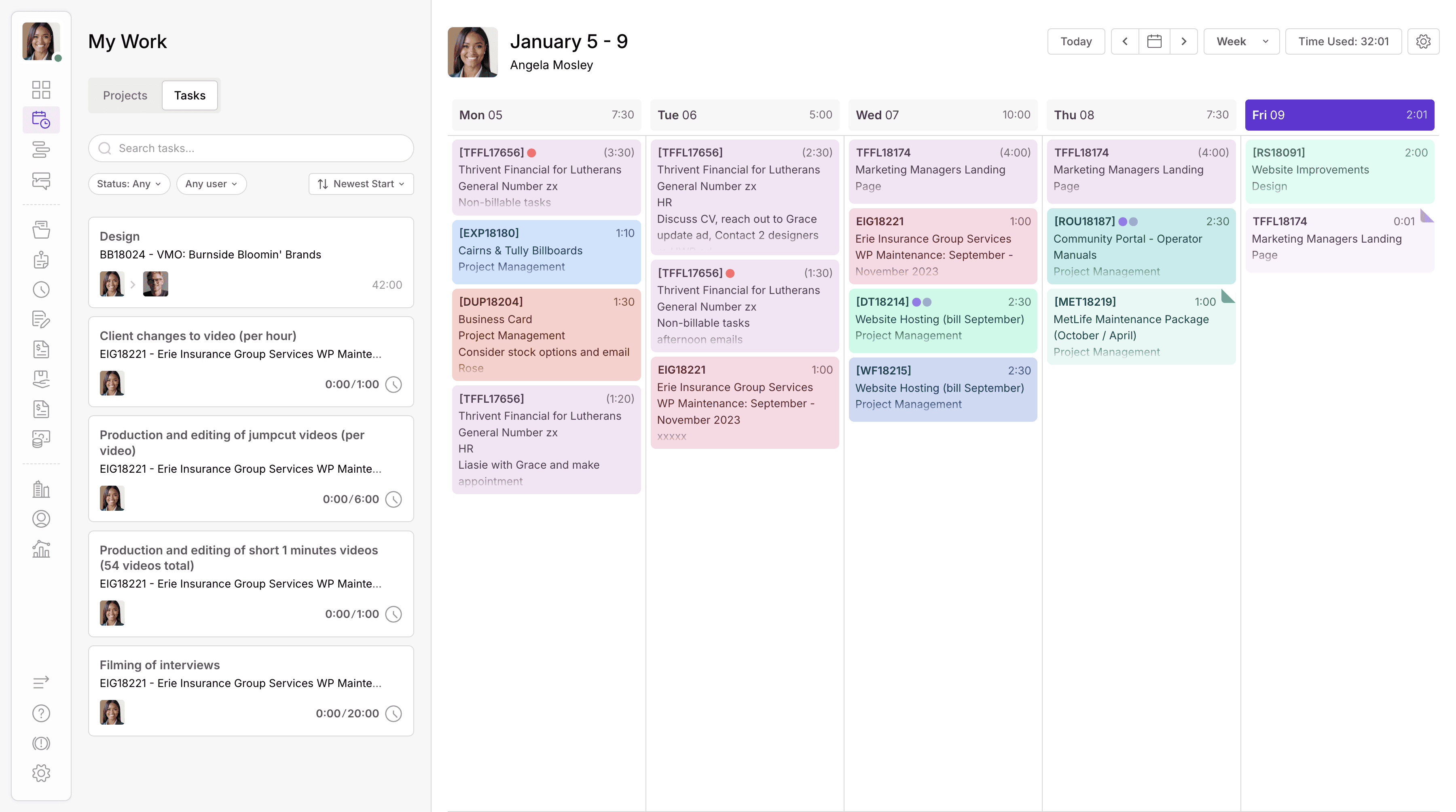
Time Blocking
Keep it simple with easy to use board-style time tracking
Review logged time in a simplified, board-style view that makes it quick to scan entries, compare work across projects, and understand progress without unnecessary detail.
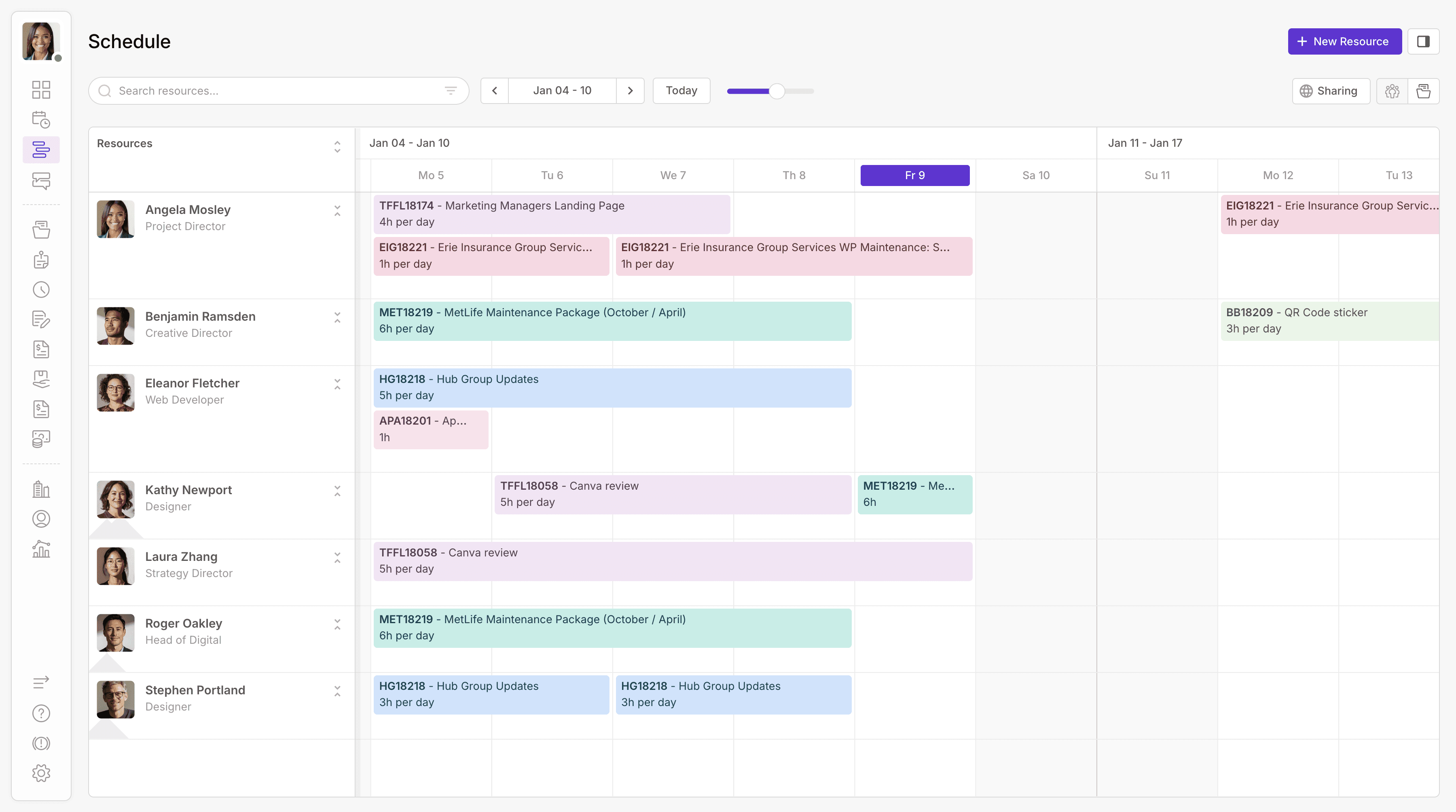
Resource Schedule
Balance workloads with a live view of time and availability
Schedule work with visibility into time and availability, making it easier to balance workloads, manage capacity, and keep teams aligned as priorities and timelines evolve.
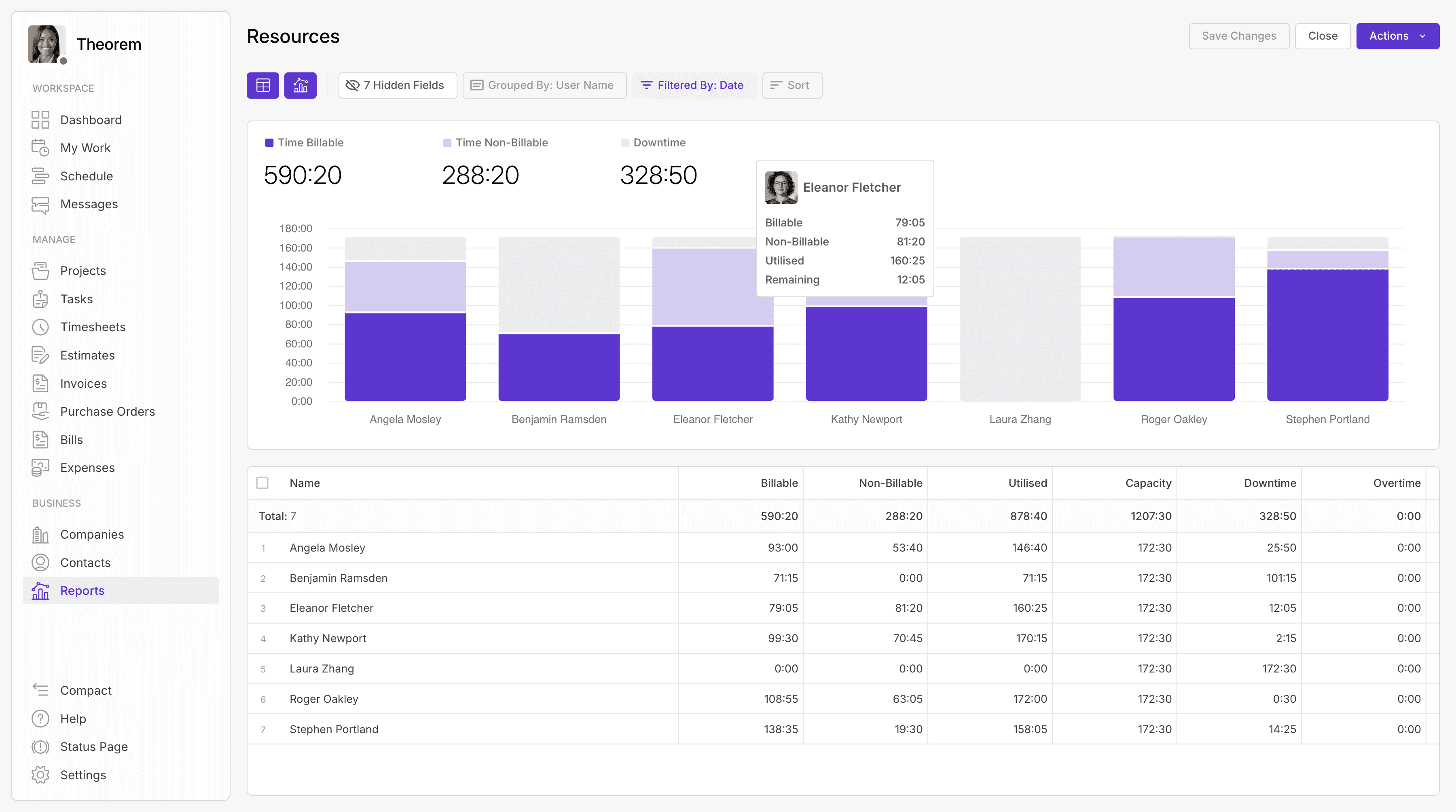
Reporting
Measure resource utilisation across your team in real-time
Track how effectively time is being used across your team, with real-time utilisation insights that support better planning, forecasting, and more informed resourcing decisions.
We’re here to answer all your questions.
How does Wiplist support project management?
Wiplist brings planning, delivery, and reporting together in one connected workspace — keeping every stage of a project clear and aligned.
Can I see how projects are progressing in real time?
Yes. Live updates across tasks, schedules, and budgets give you an instant view of progress, performance, and priorities.
How are tasks and responsibilities organised?
Each project can be structured into tasks, phases, or milestones — making it easy to assign ownership and track completion.
Can I manage multiple projects at once?
Absolutely. The project dashboard lets you view and manage all active work in one place, helping teams balance priorities effectively.
How does Wiplist help prevent missed deadlines or overspending?
Real-time tracking highlights upcoming deadlines, budget use, and workload pressure early — so teams can adjust before issues arise.
Can workflows be customised for different project types?
Yes. You can create workflows that match your delivery style — whether structured, flexible, or collaborative — for consistency across teams.
How does Wiplist support collaboration during projects?
Communication, files, and feedback stay connected to the work itself, so everyone stays informed and aligned as the project develops.
What kind of reporting is available for project managers?
Detailed analytics show time, cost, and progress across every project, helping managers make confident, data-led decisions.